Excel IFERROR Function
Summary
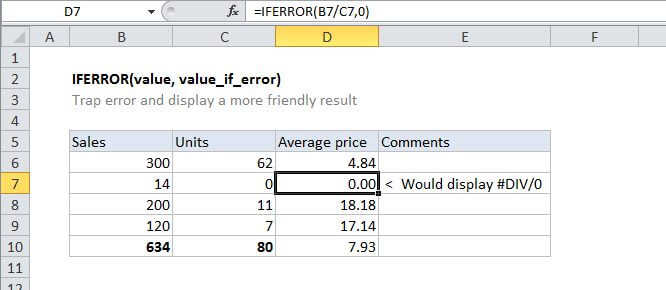
The Excel IFERROR function returns a custom result when a formula generates an error, and a standard result when no error is detected. IFERROR is an elegant way to trap and manage errors without using more complicated nested IF statements.
Purpose
Trap and handle errors
Return value
The value you specify for error conditions.
Syntax
=IFERROR (value, value_if_error)
Arguments
- value - The value, reference, or formula to check for an error.
- value_if_error - The value to return if an error is found.
Usage notes
Use the IFERROR function to trap and handle errors produced by other formulas or functions. IFERROR checks for the following errors: #N/A, #VALUE!, #REF!, #DIV/0!, #NUM!, #NAME?, or #NULL!.
For example, if A1 contains 10, B1 is blank, and C1 contains the formula =A1/B1, the following formula will catch the #DIV/0! error that results from piding A1 by B1:
=IFERROR (A1/B1,"Please enter a value in B1")
In this case, C1 will display the message "Please enter a value in B1" if B1 is blank or zero.
You can also use the IFERROR function to catch the #N/A error thrown by VLOOKUP when a lookup value isn't found:
=IFERROR(VLOOKUP(value,data,column,0),"Not found")
When VLOOKUP returns a result, IFERROR functions that result. If VLOOKUP returns #N/A, IFERROR returns "Not Found".
Notes:
- If value is empty, it is evaluated as an empty string ("") and not an error.
- If value_if_error is supplied as an empty string (""), no message is displayed when an error is detected.
- If IFERROR is entered as an array formula, it returns an array of results with one item for each cell in value.
- In Excel 2013+, you can use the IFNA function to trap and handle #N/A errors specifically.