Excel DSTDEVP Function
Summary
The Excel DSTDEVP function returns the standard deviation for an entire population of data extracted from records that match the given criteria. If data represents the entire population, use the DSTDEVP function.
Purpose
Get standard deviation of population in matching records
Return value
The calculated standard deviation
Syntax
=DSTDEVP (database, field, criteria)
Arguments
- database - Database range including headers.
- field - Field name or index to count.
- criteria - Criteria range including headers.
Usage notes
The Excel DSTDEVP function gets the standard deviation of data that represents an entire population, extracted from records matching criteria. Basically, DSTDEVP calculates standard deviation with a subset of data, like a "standard deviation IF" formula.
The database argument is a range of cells that includes field headers, field is the name or index of the field to query, and criteria is a range of cells with headers that match those in database.
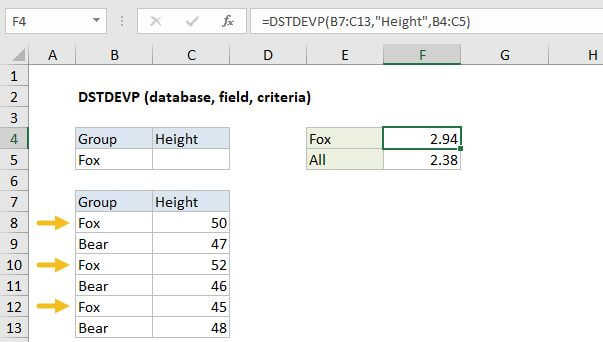
Using the example above, you can get the standard deviation of heights for the group "Fox" with either of these formulas:
=DSTDEVP(B7:C13,"Height",B4:C5) // field by name=DSTDEVP(B7:C13,2,B4:C5) // field by index
The standard deviation for all heights in C8:C13 is calculated in F5 with the STDEV.P function:
=STDEV.P(C8:C13)
Criteria options
The criteria can include a variety of expressions, including some wildcards. The table below shows some examples:
| Criteria | Behavior |
|---|---|
| Red | Match "red" or "RED" |
| Re* | Begins with "re" |
| 10 | Equal to 10 |
| >10 | Greater than 10 |
| <> | Not blank |
| <>100 | Not 100 |
| >12/19/2017 | Greater than Dec 19, 2017 |
Note: Support for wildcards is not quite the same as with other functions like COUNTIFS, SUMIFS, MATCH etc. For example, the pattern ??? will match strings with 3 exactly characters in more modern functions, but not in the database functions. If you are using wildcards, test carefully.
Multi-row criteria
The criteria range for DSTDEVP can include more than one row below the headers. When criteria includes more than one row, each row is joined with OR logic, and the expressions in a given criteria row are joined with AND logic.
Notes:
- DSTDEVP is mean to calculate variance for an entire population. If data represents a sample, use the DSTDEV function.
- DSTDEVP supports wildcards in criteria.
- Criteria can include more than one row (as explained above).
- The field argument can be supplied as a name in double quotes ("") or as a number representing field index.
- The database and criteria ranges must include matching headers.